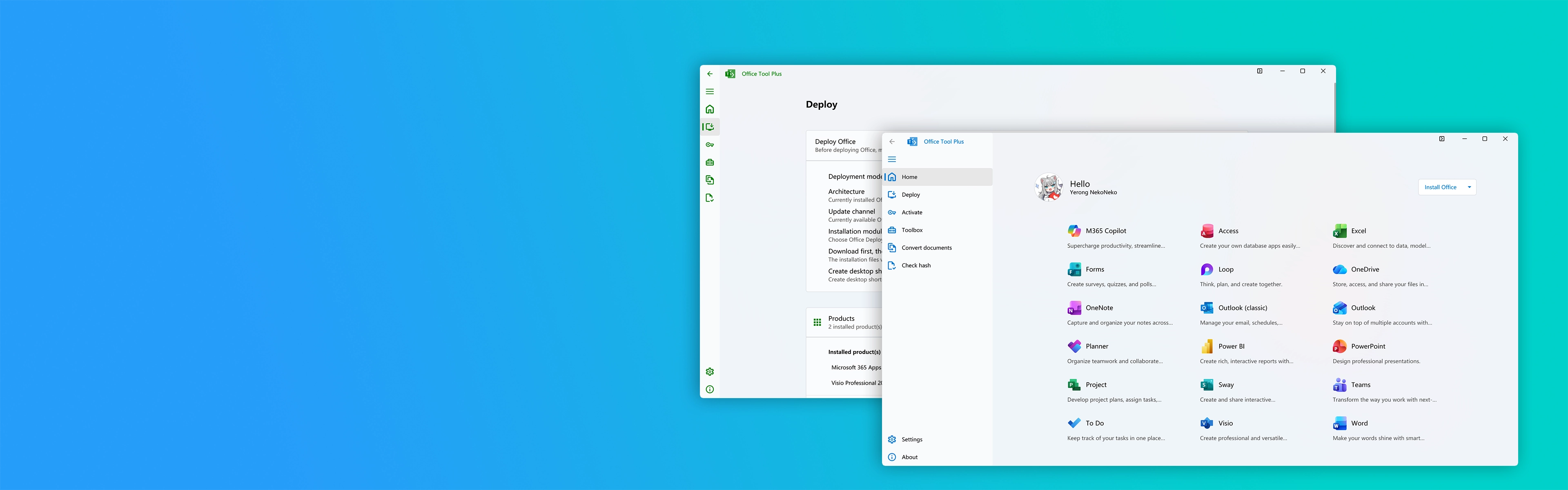
Fonctionnalités clés

Fonctionnalités principales d'Office Tool Plus

Conçu pour les administrateurs informatiques et les utilisateurs individuels, offrant une flexibilité sans égale.

Multi-Version Deployment

Deploy Microsoft 365, Office 2024, 2021, 2019, 2016, Visio, and Project across x64, x86, and ARM64.

High-Speed CDN Engine

Integrated Thunder download engine fetches official Microsoft installation packages at maximum connection speeds.

Granular Component Selection

Pick only the apps you need (Word, Excel, PowerPoint) and eliminate unwanted bloatware effortlessly.

License & KMS Management

Manage product keys, configure custom KMS host addresses, and inspect license statuses in real time.

Offline Packages & ISO Creation

Download full installation files for offline deployment or package them into bootable ISO images with one click.

One-Click Clean & Force Uninstall

Completely remove stubborn, corrupted, or leftover Office installations and reset licenses safely.

Téléchargements directs rapides

Télécharger Office Tool Plus

Obtenez la dernière version authentique d'Office Tool Plus avec runtime pré-packagé pour un lancement immédiat sous Windows.

Office Tool Plus (32 bits)

Version stable optimisée avec runtime pour Windows 32 bits et systèmes plus anciens.

  • Version: 10.30.43.0 (LTS Stable)
  • Includes: .NET Desktop Runtime pre-packaged
  • Supported OS: Windows 10, 8.1, 8, 7 (32/64-bit)
  • Architecture: x86 (32-bit)
Télécharger 32 bits (v10.30.43.0)

Installation via le Gestionnaire de paquets Windows (Winget)

Installez Office Tool Plus directement depuis votre terminal PowerShell avec les droits administrateur :

Windows PowerShell (Run as Administrator)
winget install Yerong.OfficeToolPlus

Après l'installation, lancez l'application en exécutant simplement OfficeToolPlus dans PowerShell ou l'invite de commandes.

Autres téléchargements de logiciels et versions archivées

Vous recherchez des versions spécifiques ou la prise en charge d'anciens systèmes Windows ? Choisissez parmi les versions officielles ci-dessous :

Release / Edition Target Architecture / OS Package Type Download
Office Tool Plus v11.7.9.0 Windows 11 / 10 (64-bit) ZIP (with .NET Runtime) Télécharger
Office Tool Plus v10.30.43.0 Windows 10 / 8.1 / 8 / 7 (32-bit) ZIP (with .NET Runtime) Télécharger
Office Tool Plus v9.0.4.2 Windows Vista / Windows XP Legacy ZIP Archive Télécharger

Sommes de contrôle cryptographiques (Vérification SHA-256)

Vérifiez l'authenticité de vos archives téléchargées via PowerShell : Get-FileHash

File NameSHA-256 HashStatus
Office_Tool_with_runtime_v11.7.9.0_x64.zip d73c88a873155ebc40efbe781e18bf641a9957262078693eb1492ba61b585fe7 Vérifié Sain
Office_Tool_with_runtime_v10.30.43.0_x86.zip 901fbaf8e76a6cfb1604a11c81cbbf633dc9bc6c70b69ff32f91a56658141ae6 Vérifié Sain

Présentation d'Office Tool Plus

Office Tool Plus (OTP) is the industry-standard administration utility created by Yerong to streamline the deployment, customization, and maintenance of the Microsoft Office ecosystem.

Historically, configuring and deploying Microsoft Office in corporate enterprise settings, educational computer laboratories, or custom desktop setups required deep familiarity with Microsoft's official Office Deployment Tool (ODT) and complex manual configuration.xml authoring. Administrators had to manually look up obscure product IDs, update channel strings, language codes, and component exclusion flags to prevent bloatware from being installed.

Office Tool Plus bridges this gap by offering an elegant, modern graphical user interface on top of the native Office Click-to-Run (C2R) deployment engine. Without editing a single line of raw XML, users can customize exactly which applications are installed (such as installing only Word, Excel, and PowerPoint while excluding OneDrive, Teams, Publisher, or Access), select specific language packs, choose from various Microsoft update channels, and set up offline installation media.

Unlike third-party repackaged installers, Office Tool Plus does not contain cracked or modified binaries. Every package it pulls is streamed directly from official Microsoft Content Delivery Network (CDN) servers, ensuring 100% digital signature integrity, malware freedom, and security compliance.

Quick Facts

  • Developer: Yerong (Landian)
  • Core Architecture: Microsoft ODT & C2R Engine
  • License: 100% Free / Open Utility
  • Latest Version: 11.7.9.0
  • Source Engine: Official Microsoft CDN Servers
  • Deployment Targets: Microsoft 365, Office 2024/2021/2019/2016, Visio, Project

Fonctionnalités détaillées d'Office Tool Plus

Explore the comprehensive toolset that makes Office Tool Plus the ultimate Microsoft Office deployment utility.

Granular Component Selection

Choose only the applications you actually need. Deselect bloatware applications such as Microsoft Teams, OneDrive, Skype for Business, Groove, Access, or Publisher to save gigabytes of disk space and memory.

Multi-Engine Downloader

Leverage integrated multi-threaded download engines including Thunder (Xunlei) and Aria2 to stream Office installation files directly from Microsoft servers at the highest possible speeds.

Offline ISO Image Generator

Bundle all downloaded Office installation files into a bootable or mountable ISO archive. Distribute installations to air-gapped computers, offline laptops, or deploy via bootable USB thumb drives.

Multi-Language Pack Management

Install primary, secondary, and fallback interface languages, plus specialized spellchecking and proofing tools across over 40 supported languages without reinstalling the suite.

Update Channel Switcher

Easily switch between Microsoft's Current Channel, Monthly Enterprise Channel, Semi-Annual Enterprise Channel, and Insider Beta Channel without modifying your existing software installation.

Deep Force-Removal Cleaner

When Windows Control Panel fails or Office uninstallation breaks, use the built-in Force-Removal tool to purge corrupt registry keys, hung Click-to-Run services, and leftover license tokens.

KMS & License Manager

Configure organization KMS host addresses, check license status, manage GVLK product keys, and clear invalid product licenses seamlessly inside the dedicated Activation tab.

XML & CLI Automation

Import and export standardized Office Deployment Tool XML configuration files or generate silent command-line installation scripts for enterprise orchestration systems like Microsoft Intune and SCCM.

Batch Document Converter

Quickly convert batches of Word documents, PowerPoint presentations, and Excel spreadsheets across classic formats (.doc, .xls, .ppt) and modern open XML formats (.docx, .xlsx, .pptx) without opening each file.

Avantages de l'utilisation d'Office Tool Plus

Why IT engineers, systems integrators, and students choose Office Tool Plus over the default Microsoft installer.

Massive Bandwidth & Disk Space Savings

The default Microsoft 365 web installer forces a full installation of every bundled tool, including Teams, OneDrive, Skype for Business, and Access, consuming 4 GB+ of disk space and background system RAM. Office Tool Plus lets you isolate only the apps you use (like Word and Excel), cutting disk footprint by up to 60%.

Official Digital Signatures & Zero Malware

Unlike shady repacks and cracked installers circulating online that often bundle coin miners or trojans, Office Tool Plus is an open management tool. All downloaded cabinet files (.cab) and binary streams come directly from official Microsoft domains, ensuring strict cryptographic verification.

True Air-Gapped Offline Deployment

Standard Office web installers cannot run without an active internet connection. With Office Tool Plus, you can download installation files once and deploy them to dozens of PCs or air-gapped workstations completely offline, saving hours of download time.

Side-by-Side Visio & Project Coexistence

Installing standalone Visio or Project alongside Microsoft 365 frequently causes Click-to-Run conflict errors in standard installers. Office Tool Plus automatically harmonizes channels, build numbers, and architecture so all apps coexist without error.

Comment utiliser Office Tool Plus (Guide étape par étape)

Follow these straightforward steps to deploy your customized Microsoft Office suite.

1
Launch as Admin

Extract the downloaded zip archive and right-click Office Tool Plus.exe. Select Run as administrator to ensure proper system privileges.

2
Select Products

Navigate to the Deploy tab. Under Products, click Add Product and choose your desired suite (e.g., Microsoft 365 Apps for enterprise or Office LTSC 2024).

3
Customize Apps

Select your preferred architecture (64-bit or 32-bit), select language packs, and check only the applications you need (e.g. Word, Excel, PowerPoint).

4
Start Deploy

Click Start Deploy. Office Tool Plus will stream the necessary files directly from Microsoft CDN servers and complete the installation seamlessly.

Comment installer Office Tool Plus

Choose between the portable ZIP method or the modern Windows Package Manager (Winget) installation.

Method 1: Portable ZIP Archive (Recommended)

  1. Download the Office Tool Plus with runtime zip package from the download section above (64-bit for Windows 10/11 or 32-bit for legacy systems).
  2. Locate the downloaded .zip file in your Downloads folder, right-click it, and select Extract All....
  3. Open the extracted folder and find Office Tool Plus.exe.
  4. Right-click the executable and select Run as administrator. Office Tool Plus will launch immediately without needing any traditional installation wizard.
Pro Tip: The "with runtime" zip packages include Microsoft .NET Desktop Runtime 8.0 pre-packaged, meaning it works out of the box on fresh Windows installs.

Method 2: Command-Line via Winget

Windows 11 and modern Windows 10 machines support direct installation via the built-in Windows Package Manager:

PowerShell (Administrator)
winget install Yerong.OfficeToolPlus

To start Office Tool Plus after installing via Winget, run:

Run Command
OfficeToolPlus

Systèmes d'exploitation pris en charge

Office Tool Plus is engineered for deep compatibility across desktop, workstation, and server Windows releases.

Operating System Supported Architecture Recommended OTP Version Compatibility Status
Windows 11 (24H2, 23H2, 22H2, 21H2) 64-bit (x64), ARM64 v11.7.9.0 (with runtime) Fully Supported (Optimal)
Windows 10 (22H2, 21H2, LTSC 2021/2019) 64-bit (x64), 32-bit (x86) v11.7.9.0 (x64) / v10.30.43.0 (x86) Fully Supported
Windows Server (2025, 2022, 2019, 2016) 64-bit (x64) v11.7.9.0 (with runtime) Fully Supported
Windows 8.1 & Windows 8 64-bit (x64), 32-bit (x86) v10.30.43.0 (LTS Stable) Supported via Legacy Build
Windows 7 (SP1 with SHA-2 updates) 64-bit (x64), 32-bit (x86) v10.30.43.0 (LTS Stable) Supported via Legacy Build
Windows Vista & Windows XP 32-bit (x86) v9.0.4.2 Archived Support

Appareils pris en charge

Deploy Microsoft Office reliably across every form factor in your organization.

Desktop Workstations

High-performance corporate, gaming, and design rigs running multi-core Intel, AMD Ryzen, or Xeon hardware.

Laptops & Ultrabooks

Standard business notebooks from Dell, Lenovo, HP, Acer, ASUS, and Razer with battery-conscious background execution.

Microsoft Surface & 2-in-1s

Touchscreen Surface Pro, Surface Laptop, and convertible notebooks with high-DPI display scaling support.

Windows on ARM Devices

Next-gen Copilot+ PCs powered by Qualcomm Snapdragon X Elite, Snapdragon Plus, SQ1, SQ2, and SQ3 chips.

Virtual Machines & Cloud

VMware Workstation, Microsoft Hyper-V, Proxmox VE, VirtualBox, and cloud environments like Azure Virtual Desktop.

Portable USB Media

Run Office Tool Plus directly off portable USB drives to service customer machines and offline network clusters.

Foire Aux Questions (FAQ)

Got questions about Office Tool Plus? Find comprehensive answers to the 15 most common inquiries below.

Office Tool Plus is an advanced management and deployment software utility developed by Yerong (Landian). It is built upon Microsoft's official Office Deployment Tool (ODT) and Click-to-Run (C2R) distribution framework, offering an intuitive graphical interface to configure, download, deploy, activate, and repair Microsoft Office suites without writing manual XML scripts.

Yes, Office Tool Plus is 100% free of charge. It contains no bundled adware, toolbars, cryptocurrency miners, or third-party spyware. All source links point directly to official Microsoft CDN distribution servers, ensuring total file safety and authenticity.

All installation files are pulled directly from Microsoft's official Content Delivery Network servers (officecdn.microsoft.com). Office Tool Plus does not re-host, tamper with, or modify any official Microsoft installation payload.

Office Tool Plus supports Microsoft 365 (Enterprise, Business, Home), Office 2024, Office 2021, Office 2019, Office 2016, as well as Visio and Project releases from 2016 through 2024.

The "with runtime" edition includes Microsoft .NET Desktop Runtime pre-packaged inside the zip, allowing it to run immediately on any PC. The "without runtime" version is a smaller archive designed for machines that already have .NET Desktop Runtime 8.0 installed.

Download the 64-bit version (v11.7.9.0) if you are running modern 64-bit Windows 11 or Windows 10. If you are operating on a 32-bit Windows edition or an older operating system like Windows 7, 8, or 8.1, download the 32-bit v10.30.43.0 release.

Launch PowerShell as administrator and enter: winget install Yerong.OfficeToolPlus. After installation finishes, you can run the tool by typing OfficeToolPlus into your terminal or search bar.

Yes. In the Deploy or Download tabs, download your preferred Office installation files, then select Create ISO. Office Tool Plus will package the Click-to-Run files into a clean ISO image suitable for offline installs and USB deployment.

Under the Deploy tab, you will see a list of individual application checkboxes (Word, Excel, PowerPoint, Outlook, Access, Publisher, OneNote, Teams, OneDrive). Simply uncheck the apps you do not want before clicking Start Deploy.

Under the Toolbox tab, select Uninstall Office and trigger the deep force-removal engine. It will terminate hung Click-to-Run services, wipe broken registry keys, and delete cached setup files that prevent fresh installations.

Yes. In the Toolbox tab, use the Change Update Channel feature to switch between Current, Monthly Enterprise, Semi-Annual, and Beta Insider channels. Office will automatically adjust its update path during the next update cycle.

Yes, version 11.7.9.0 is fully certified and tested for modern Windows 11 (including versions 24H2, 23H2, and 22H2) and Windows 10 (version 22H2 and Enterprise LTSC releases).

Because Office Tool Plus interacts with Windows services, system registry hives, and internal ODT APIs to install and remove software, heuristic security engines may occasionally flag it. The software is completely open, safe, clean, and contains zero malicious payloads.

Yes. In the Deploy tab, simply add Visio Professional or Project Professional as additional products to your configuration. Office Tool Plus automatically aligns the Click-to-Run channels and build numbers so they coexist harmoniously.

Open the Activation tab, input your organization's legitimate KMS host address and port (default 1688), install the matching GVLK volume license key, and click Activate to trigger instantaneous validation.

Yes. Office Tool Plus v11.7.9.0 provides full first-day support for Microsoft Office 2024 LTSC (PerpetualVL2024 channel), including ProPlus 2024 Volume, Standard 2024, Visio 2024, and Project 2024 with complete application exclusion and language pack configuration.

Yes. Office Tool Plus natively runs on ARM64 processors (such as Qualcomm Snapdragon X Elite and Snapdragon X Plus) and supports deploying native compiled ARM64 Click-to-Run builds of Microsoft 365 without emulation overhead.

In Office Tool Plus, navigate to the Deploy tab and configure your suite, architecture, and excluded apps. Click the 'Export XML' button at the bottom to generate a clean Configuration.xml file ready for direct upload into Microsoft Intune or SCCM distribution packages.

Current Channel delivers the latest features as soon as they are ready (multiple times a month). Monthly Enterprise Channel provides updates once a month on Patch Tuesday for predictable enterprise staging. Semi-Annual Enterprise Channel updates features only twice a year for environments that require extensive pre-deployment testing.

No. Microsoft Click-to-Run architecture prohibits installing mixed 32-bit and 64-bit Office products on the same operating system instance. If you have an existing 32-bit Office product and wish to upgrade to 64-bit, use Office Tool Plus's Toolbox to Force Remove the 32-bit build before deploying 64-bit.
Hardware Architecture Optimization

64-Bit vs 32-Bit & ARM64 Deployment Architecture

Selecting the optimal binary architecture is essential to prevent performance bottlenecks, out-of-memory crashes, and add-in incompatibilities.

64-Bit Architecture (x64)

The gold standard for modern computing environments running Windows 11 and Windows 10 64-bit.

  • Memory Ceiling: Breaks the 2 GB memory limitation, allowing Excel workbooks over 2 GB.
  • Complex Data Models: Native support for Power BI, complex DAX formulas, and massive Access databases.
  • Recommendation: Recommended by Microsoft as default for all systems with 4 GB+ RAM.

32-Bit Architecture (x86)

Designed for legacy workstations and specialized business environments with older COM/VBA dependencies.

  • COM & ActiveX Add-ins: Required if your workflow depends on legacy 32-bit compiled plugins.
  • Low RAM Footprint: Ideal for older budget machines with 2 GB to 3 GB of total system RAM.
  • Legacy Windows: Compatible with 32-bit installations of Windows 10, 8.1, and Windows 7.

Native ARM64 Architecture

Fully optimized for next-generation Windows on ARM devices, Copilot+ PCs, and Surface Pro tablets.

  • Zero Emulation Overhead: Runs native compiled ARM64 code on Snapdragon X Elite and X Plus processors.
  • All-Day Battery Life: Minimizes CPU wake cycles and thermal dissipation during continuous typing and presentations.
  • Seamless Deployment: Office Tool Plus automatically detects and provisions ARM64 Click-to-Run builds.
Servicing Channels

Click-to-Run (C2R) Update Channel Guide

Understand the different Microsoft release branches to balance brand-new productivity features with enterprise-grade stability.

Channel Name Update Frequency Target Audience Best Used For
Current Channel Multiple times per month (As features are ready) Power Users, Small Businesses Immediate access to newest Office AI features, UI enhancements, and formula updates.
Monthly Enterprise Channel Once a month (Second Tuesday Patch Tuesday) Corporate Workstations Predictable monthly schedule combining security patches and quality-tested features.
Semi-Annual Enterprise Channel Twice a year (January and July) Mission-Critical Enterprise Systems Maximum operational stability for medical, banking, and government workstations.
Perpetual LTSC (2024 / 2021) Security patches only (No feature changes) Regulated Environments & Air-Gapped Labs Static feature-locked deployment for systems that cannot accommodate feature alterations.
Beta / Dev Channel Weekly or bi-weekly pre-release builds Developers & IT Administrators Testing upcoming Office capabilities and validating corporate add-in compatibility.
Enterprise IT Automation

Automated XML Generation for Intune, SCCM & GPO

Manually authoring Configuration.xml files for Microsoft Endpoint Manager (Intune), System Center Configuration Manager (SCCM), or Group Policy scripts is prone to syntax errors. Office Tool Plus features an interactive visual editor that exports 100% compliant Microsoft XML schemas with one click.

  • Display Level: Toggle unattended background silent installation (Display Level="None").
  • Auto-Accept EULA: Suppress license agreement prompts during bulk deployments.
  • Custom Fallback CDN: Configure backup download paths when local distribution shares are offline.
  • Shared Computer Activation: Enable RDS/VDI shared activation for multi-user Citrix or Remote Desktop servers.
Read ODT vs OTP Comparison
Sample Generated Configuration.xml
<Configuration>
  <Add OfficeClientEdition="64" Channel="PerpetualVL2024">
    <Product ID="ProPlus2024Volume">
      <Language ID="en-us" />
      <ExcludeApp ID="OneDrive" />
      <ExcludeApp ID="Teams" />
    </Product>
  </Add>
  <Display Level="None" AcceptEULA="TRUE" />
  <Property Name="AUTOACTIVATE" Value="1" />
</Configuration>

Historique des versions et modifications

Track the development and continuous enhancements of Office Tool Plus.

v11.7.9.0 Latest Release (09/09/2026)
  • Updated core Click-to-Run (C2R) deployment engine compatibility with Windows 11 24H2.
  • Upgraded integrated .NET 8 Desktop Runtime libraries for faster launch performance.
  • Optimized Thunder and Aria2 multi-threaded download algorithms for Microsoft CDN mirrors.
  • Updated localization translations and UI accessibility strings across 40+ languages.
v11.6.4.0 Feature Update
  • Added initial deployment support for Microsoft Office 2024 preview and perpetual enterprise channels.
  • Enhanced offline ISO packaging builder with larger cluster block support.
  • Refined license token cleanup logic in the integrated Toolbox.
v11.0.0.0 Major Architecture Upgrade
  • Complete UI overhaul adopting modern Fluent design principles with dark mode support.
  • Migrated core framework to modern .NET architecture for enhanced stability and lower memory usage.
  • Redesigned Toolbox suite with one-click Office force-removal and channel switching.
v10.30.43.0 LTS Stable (Legacy Systems)
  • Final long-term support release specifically optimized for Windows 7, 8, 8.1, and 32-bit (x86) architectures.
  • Full compatibility with Office 2016, 2019, and 2021 perpetual volume suites.
v9.0.4.2 Archived Legacy
  • Dedicated legacy edition supporting classic Windows XP and Windows Vista deployments.

Dépannage et résolution des erreurs courantes

Quickly diagnose and resolve common issues encountered during Microsoft Office deployment.

Error 30088 / 30125
Network Stream Interrupted

Cause: Connection drops or DNS blocks preventing communication with Microsoft CDN servers.

Fix: Switch download engine to Thunder/Aria2 in settings, flush your DNS with ipconfig /flushdns, or pre-download the Office files to an offline folder before deploying.

Error 30015 / 30016
Another Installation in Progress

Cause: A previous installation or Windows Update locked the Click-to-Run installer mutex.

Fix: Open Task Manager, end all instances of OfficeClickToRun.exe and setup.exe, or use Office Tool Plus Toolbox > Force Remove Office, then restart your PC.

Missing .NET Runtime
Application Fails to Open

Cause: Host machine lacks the required Microsoft .NET Desktop Runtime environment.

Fix: Download the Office Tool Plus with runtime zip package from our download section, which includes the runtime pre-packaged.

SmartScreen Warning
Windows Protected Your PC

Cause: Microsoft Defender flags newly compiled utility binaries without high download reputation.

Fix: Click More info on the blue prompt, then click Run anyway. Office Tool Plus is open, clean, and thoroughly verified.

KMS Error 0xC004F074
KMS Host Unreachable

Cause: The specified Key Management Service host cannot be contacted over port 1688.

Fix: Ensure your network firewall permits outbound TCP traffic on port 1688, confirm your KMS server IP/domain is active, and ensure your system clock is synchronized.

Installation Rolled Back
Corrupt Leftover Registry Keys

Cause: Fragments from an uninstalled previous Office build conflict with the new deployment.

Fix: Open Office Tool Plus, navigate to Toolbox, run the Force Remove Office tool, restart your PC, and proceed with a fresh installation.